
Installer IPTV på din Enigma2/Dreambox/Vu+
- marts 2021
Faktisk er disse to IPTV-bokse i øjeblikket meget populære i Storbritannien og andre dele af verden, og jeg tror, det er derfor, du har en derhjemme! Vi antager, at du er her, fordi du gerne vil lære, hvordan man griber Enigma 2 eller Zgemma IPTV-opsætningen an, som er standard på tværs af hele linjen.
For at tilføje kanaler til din Enigma2/Dreambox/Vu+-enhed, følg nedenstående trin:
TRIN 1:
Gå til din Enigma2 og få din IP-adresse.
Gå til indstillinger/opsætning/systemopsætning af netværksenhedsadapterindstillinger.
Og få din IP-adresse, den starter med 192.168…..
TRIN 2:
Gå til din Windows-pc og download Putty Software.
Putty dURLload URL https://the.earth.li/~sgtatham/putty/latest/x86/putty.exe
TRIN 3:
Åbn Putty og følg disse trin.
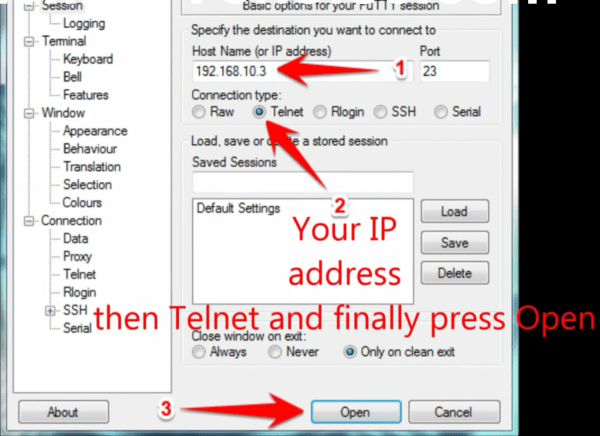
Tilføj din IP-adresse på din Enigma (samme IP som trin 1) Port 23 Forbindelsestype Telenet Klik på “Åbn”.
TRIN 4:
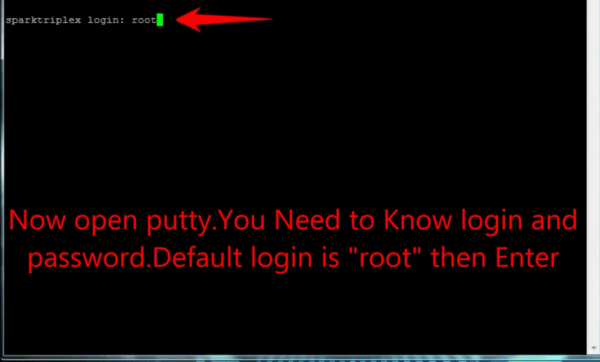
Dit standard login og adgangskode er root.
TRIN 5:
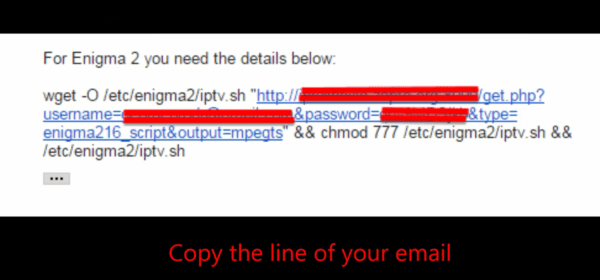
Kopier din URL-linje (du får den, når du har bestilt dit abonnement).
TRIN 6:
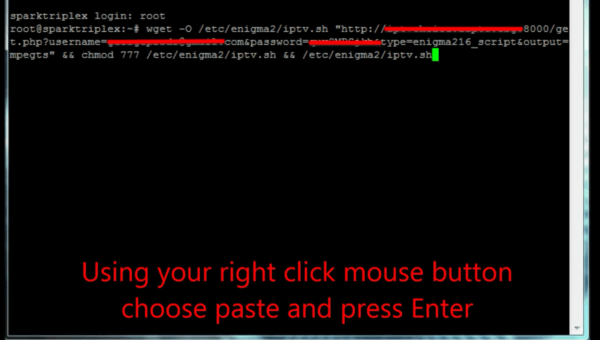
Brug HØJREKLIK PÅ MUSEKNAPPEN, efter du har indtastet din linje, tryk “ENTER”.
TRIN 7:
Skriv genstart, og din enhed genstarter.
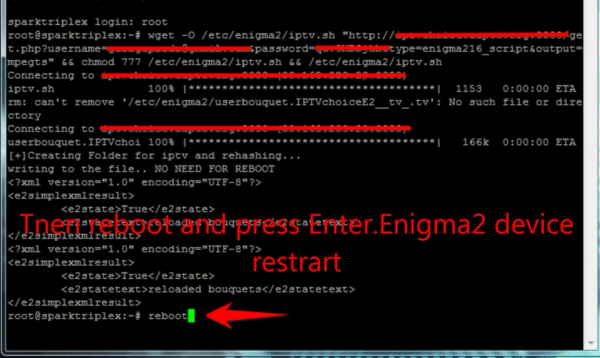
Nu finder du IPTV-mappen, alle IPTV-kanaler ligger i din IPTV-mappe.
Install IPTV on your Enigma2/Dreambox/Vu+
As a matter of fact, these two IPTV boxes are currently very popular in the United Kingdom and other parts of the world, and I believe that’s why you have one at home! We assume you are here because you would like to learn how to go about the Enigma 2 or Zgemma IPTV setup process, which is standard across the board.
In order to add channels to your Enigma2/Dreambox/Vu+ device, follow the below steps:
STEP 1:
Go to your Enigma2 and get your IP address.
Go to Settings/Setup/System Network Device Setup Adapter Settings.
And get your IP address it starts with 192.168…..
STEP 2:
Go to your windows PC and download Putty Software.
Putty dURLload URL https://the.earth.li/~sgtatham/putty/latest/x86/putty.exe
STEP 3:
Open Putty and follow these steps.
Add your IP address of your Enigma ( Same IP as step 1 ) Port 23 Connection type Telenet Click on “Open”.
STEP 4:
Your default login and password are root.
STEP 5:
Copy your URL line (you will get it after you order your subscription).
STEP 6:
Use RIGHT CLICK MOUSE BUTTON after you enter your line press “ENTER”.
STEP 7:
Type reboot and your device will restart.
Now you will find the IPTV folder, all IPTV channels are inside your IPTV folder.