
Start by downloading the Tivimate IPTV player application from the Google Play Store.

iptv quebec

Attention : Tivimate IPTV player is a paid application, it costs approximately $15 annually and around $45 for a lifetime subscription. The application itself does not contain any TV channels, movies, or TV series; you must first purchase one of our packages. The application must be purchased using an Android phone OR via an Android emulator on PC.

Once the application is installed, open it.
And click on “Add playlist”.

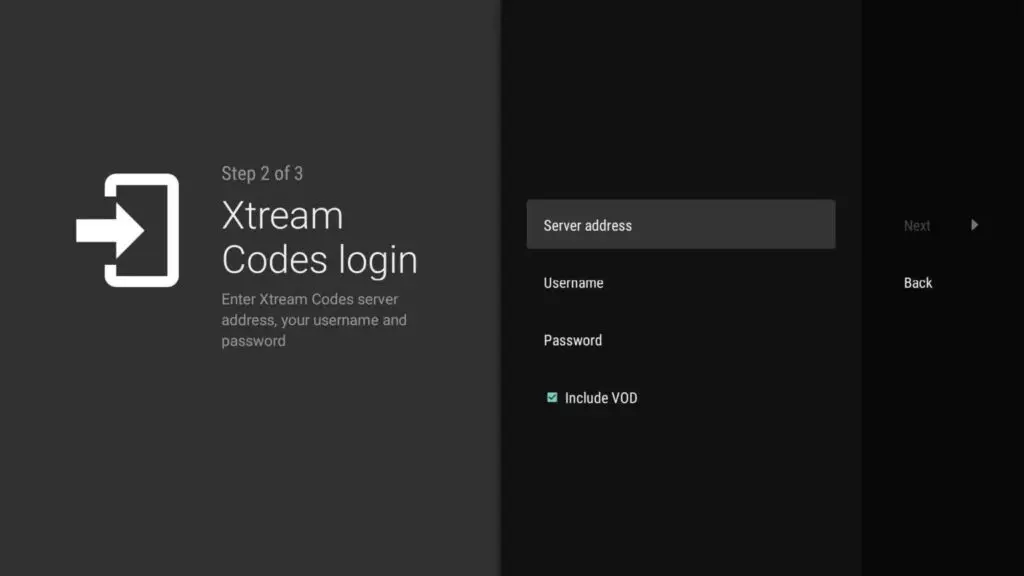
TiviMate will ask you to add a playlist using an M3U link, Xtream code, or Stalker portal. Select Xtream code. In this tutorial, we will use the Xtream code to play an IPTV service in the TiviMate application.


TiviMate vous demandera :
le url serveur :
le username :
le password :

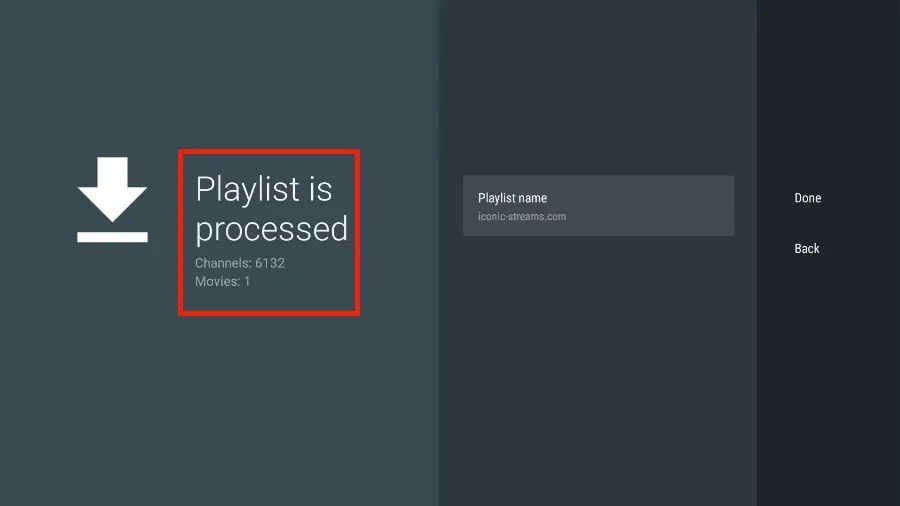
TiviMate will load the IPTV service and provide a preview of the number of channels and movies available in your package.

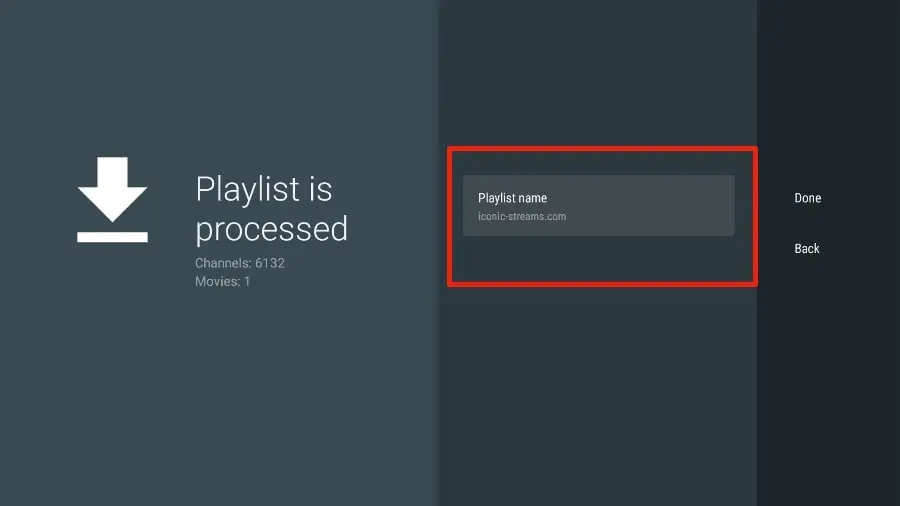
Add a playlist name.

If the playlist processing is complete, select “Done”.

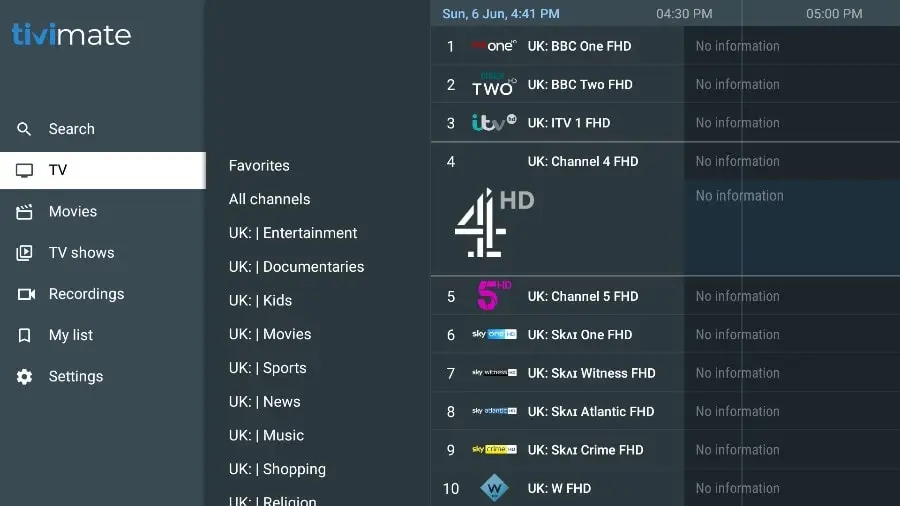
A minute or two later, you will see the content of the IPTV service appear in TiviMate.
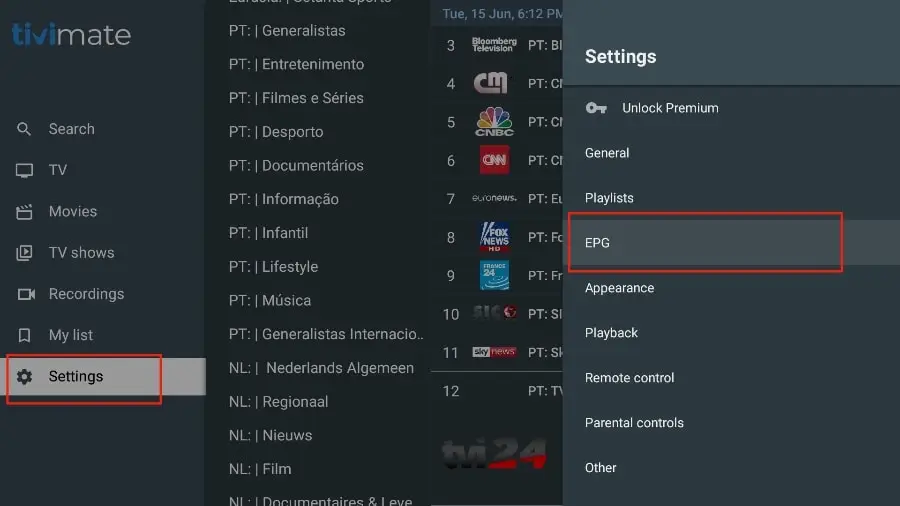
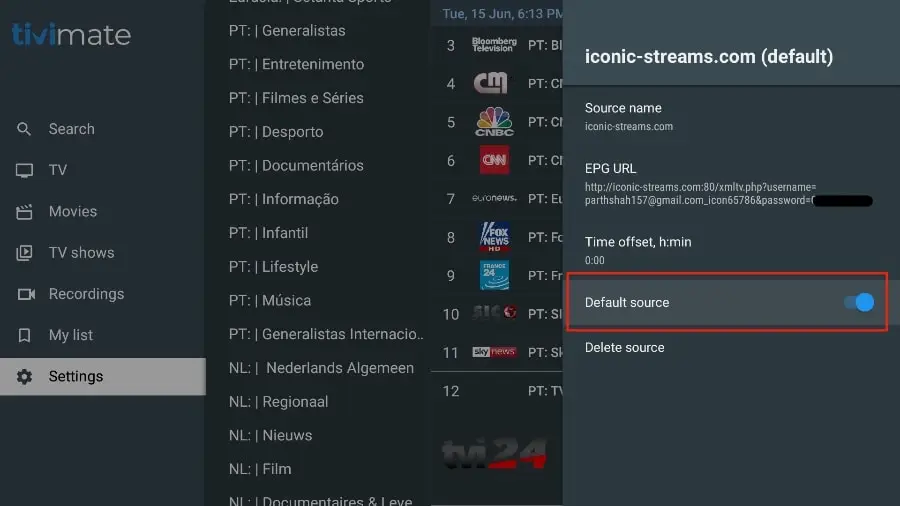
Most IPTV services come with a dedicated EPG (Electronic Program Guide), as shown below.

If you don’t see an EPG enabled in the TiviMate application, consider enabling it in the application settings.

As mentioned above, the main features of TiviMate are behind a paywall. You need to pay for the premium version to enjoy TiviMate to its fullest potential.

When you try to access a premium feature without a premium account, TiviMate will prompt you to upgrade to the premium version. For example, when you try to add a channel to your favorites list, TiviMate will prompt you to upgrade the application. If you wish to continue with the free version, you can click Cancel and continue using the free TiviMate application on FireStick.
To purchase the premium version, you need to use the TiviMate Companion app from the Google Play Store. Here’s how to proceed.

Start med at downloade Tivimate IPTV-afspiller-applikationen fra

Google Play Store.

iptv quebec

Bemærk: Tivimate IPTV-afspiller er en betalt applikation, den koster cirka 15 dollars årligt og omkring 45 dollars for et livstidsabonnement. Selve applikationen indeholder ikke tv-kanaler, film eller tv-serier; Du skal først købe en af vores pakker. Applikationen skal købes via en Android-telefon ELLER via en Android-emulator på PC.

Når applikationen er installeret, åbn den. Og klik på “Tilføj playliste”.
TiviMate vil bede dig tilføje en playliste ved hjælp af et M3U-link, Xtream-kode eller Stalker-portal. Vælg Xtream-kode. I denne vejledning vil vi bruge Xtream-koden til at afspille en IPTV-tjeneste i TiviMate-applikationen.


TiviMate vil spørge dig:

serverens url:

brugernavnet:

adgangskoden:

Du vil modtage alt dette fra Support

TiviMate indlæser IPTV-tjenesten og giver en forhåndsvisning af antallet af kanaler og film i din pakke.

Angiv playliste navn efter eget valg

Hvis afspilningsliste behandlingen er færdig, vælg  “Done”.

Et minut eller to senere vil du se indholdet af IPTV-tjenesten dukke op i TiviMate. De fleste IPTV-tjenester leveres med en dedikeret EPG

(Electronic Program Guide), som vist nedenfor.

Hvis du ikke ser en EPG aktiveret i TiviMate-applikationen, så overvej at aktivere den i applikationsindstillingerne.

Som nævnt ovenfor er hovedfunktionerne i TiviMate en betalings app. Du skal betale for premium-versionen for at nyde TiviMate fuldt ud.

Når du prøver at få adgang til en premium-funktion uden en premium-konto, vil TiviMate bede dig om at opgradere til premium-versionen.

For eksempel, når du prøver at tilføje en kanal til din favoritliste, vil TiviMate bede dig om at opgradere applikationen. Hvis du ønsker at

fortsætte med gratisversionen, kan du klikke på Annuller og fortsætte med at bruge den gratis TiviMate-applikation. Vil du købe

premium-versionen, skal du bruge TiviMate Companion-appen fra Google Play Store til, at gemmemføre købet

.

error: Content is protected !!